Here is a password field widget that not only has a password strength meter but also has other essential features that your users would love to have.
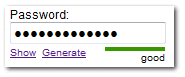
Mask or unmask? Do passwords really have to look like **** ?
When you type-in your password, the password field shows a mask. This mask supposedly prevents someone from observing your screen ‘over the shoulder’ .
But, what if I am at home with the only possible observer being my pet dog? Why not leave the option of showing/masking the password to me, the user?
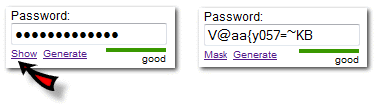
Need a strong password quickly? Generate it.
There are many good password managers available. For those users, it will just be good to generate a password for the web site and then let the password manager remember it for life. Having a password generator along with the password field will be handy.
Strength meter.
Another common feature is to have a strength meter that persuades the user to have a better password rather than their pet name. Based on some basic rules (have a number and a symbol in the password) a strength value is displayed that, hopefully, will make the user create a better password.
See the widget in action !
Try it yourself!
Download
The download contains the source and some samples.
Usage
The usage is simple. First, link to the style sheet and the JavaScript file:
<link rel="STYLESHEET" type="text/css" href="pwdwidget.css" /> <script src="pwdwidget.js" type="text/javascript"></script> Instead of the password field, use the code below.
<label for='regpwd'>Password:</label> <br /> <div class='pwdwidgetdiv' id='thepwddiv'></div> <script type="text/javascript" > var pwdwidget = new PasswordWidget('thepwddiv','regpwd'); pwdwidget.MakePWDWidget(); </script> <noscript> <div><input type='password' id='regpwd' name='regpwd' /></div> </noscript> Notice that noscript part makes sure that a normal password field is shown even if Java Script is disabled.
The parameters to the PasswordWidget() class are: (1)the ID of the div for the widget and (2)the name of the password field.
var pwdwidget = new PasswordWidget(id_of_div,name_of_passwordfield); More options
The features can be turned on/off. For example, it doesn’t make sense to have a ‘generate’ option in a log-in form. Here is the code:
var pwdwidget = new PasswordWidget('thepwddiv','regpwd'); pwdwidget.enableGenerate=false; pwdwidget.enableShowStrength=false; pwdwidget.MakePWDWidget(); Similarly, you can modify/translate the label text :
var pwdwidget = new PasswordWidget('thepwddiv','regpwd'); pwdwidget.txtShow= 'Display'; pwdwidget.txtMask= 'Hide'; pwdwidget.MakePWDWidget(); License

The Password widget is shared under LGPL license. You can freely use it on commercial or non-commercial websites.
The password widget was tested on IE7, FireFox 3, Opera 9.24, and Safari 3.1. Post your comments and suggestions. Translations and enhancements are also welcome.